
Why A Phone VoIP System Is A Smarter Choice For Modern Office Communication

Modern offices move fast, and callers notice when communication feels clunky. A missed transfer can turn into a lost opportunity, and a “call back later” moment can quietly send customers elsewhere. The smarter choice is not about chasing the newest tool. It is about building a setup that routes calls cleanly, keeps staff reachable across devices, and stays manageable as the team grows. Voice over IP approaches are popular because they replace scattered lines with one call flow, plus controls that help reception and departments stay organized. When the basics are done well, calls sound clearer, handoffs feel smoother, and workflows stop depending on one person’s memory.
VoIP Call Routing That Shortens Reception Handoffs
A well-designed phone VoIP system improves the first minutes of a call by steering it to the right place early. Simple menus, department ring groups, and direct numbers reduce the front desk sorting workload. When callers reach sales, support, or billing without extra transfers, reception can focus on exceptions instead of constant redirection. That is where efficiency shows up in real terms: fewer hold cycles, fewer repeat introductions, and fewer callers abandoning the line because the path feels confusing.
Routing works best when it reflects how their team actually operates. Clear naming, consistent extension patterns, and planned overflow rules keep calls moving when a primary group is busy. A practical approach also includes after-hours routing that matches real coverage, not wishful schedules. When the call map is documented and reviewed, changes are less risky, and new staff can follow the same logic without learning it the hard way during a busy day.
Consistency Across Desk Phones and Softphone Apps
A modern office rarely runs on one device type. Desk phones, desktop apps, and mobile clients all have a role, and clarity improves when they behave consistently. Standardized headset choices, sensible audio settings, and aligned firmware or app versions reduce the “I can’t hear you” moments that slow down conversations. When staff know the same buttons and behaviors across devices, transfers and call handling become quicker, especially for rotating coverage roles.
Remote work makes consistency even more important for customer-facing teams. Their team benefits from basic network standards for home offices, such as stable bandwidth and voice traffic prioritization on busy connections. It also helps to document simple etiquette, like avoiding noisy speakerphone spaces and confirming key details before transferring. These practices reduce follow-up calls and misunderstandings that can turn one request into several separate conversations.
VoIP Systems Transfer Tools That Keep Conversations in Motion
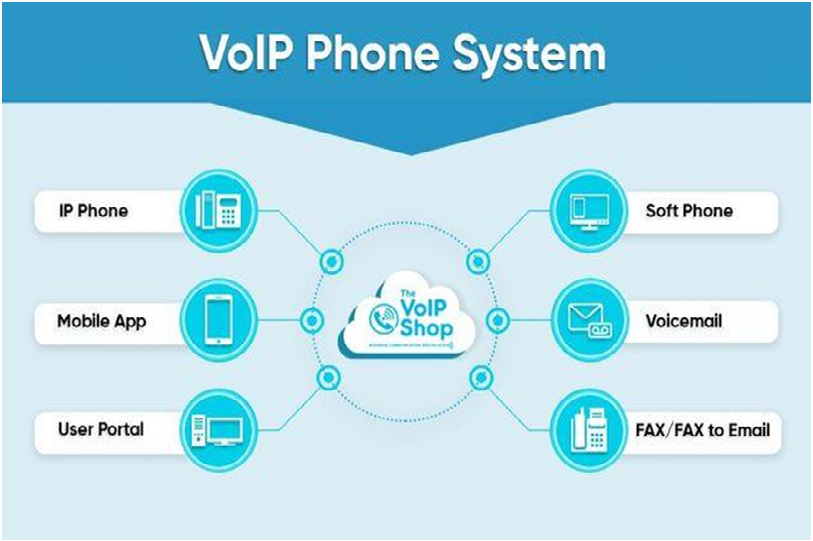
Telephone systems VoIP makes transfers cleaner when staff can see availability before moving a caller. Presence indicators, operator panels, and directory search reduce blind transfers that bounce callers between busy people. Attended transfer gives the reception a chance to confirm the destination is ready, which prevents dead-end handoffs. If the next person is unavailable, a parked call can be retrieved by the right rep without forcing the caller to hang up and try again.
Clean transfers also depend on small habits that teams can standardize. A short handoff summary, a consistent way to handle wrong-department calls, and a defined backup path reduce stress for both staff and callers. Call park, call pickup, and group voicemail options can serve as safety nets when volume spikes.
Scaling Without Rebuilding the Whole Setup
A growing team usually outgrows fixed lines first. With a phone VoIP System, adding users, departments, or locations can be less disruptive because extensions and call paths can expand without redesigning everything. New hires can be provisioned with templates, and ring groups can be adjusted as responsibilities shift. That flexibility matters for service businesses, where staffing changes and coverage models evolve, but customers still expect the same consistent experience day to day.
Scaling is also about keeping administration clean. When naming, permissions, and routing rules are managed centrally, the system is easier to audit and safer to change. It also becomes simpler to separate platform decisions from carrier decisions, which some businesses prefer for cost clarity and contract simplicity. A realistic plan still accounts for network and upstream dependencies, but a scalable structure gives the team more control over what can be improved internally.
Security and Admin Controls That Protect Uptime
Telephone systems VoIP support modern offices best when reliability is treated as policy, not luck. Strong passwords, role-based permissions, and controlled calling rules reduce misuse that can create disruption. Admin access should be limited to trained roles, and high-impact changes, like routing edits or dialing permissions, should follow a review step with clear ownership. This keeps a rushed tweak from breaking a main number during a high-pressure period for the front desk.
Change control also protects workflow predictability. Their team can track updates in a simple log, document who owns each ring group and voicemail box, and test key call paths after changes. If directory sync or third-party integrations are used, they should be validated after updates so the caller identity and routing stay correct.
Reporting That Turns Call Problems into Clear Improvements
Call data is where communication becomes measurable. Reports can show missed calls, abandoned queues, and transfer patterns that create friction. When teams review these patterns regularly, they can adjust staffing, rewrite menu prompts, and refine overflow rules based on evidence. Many offices also use simple dashboards to spot sudden changes in volume or unanswered calls before they become a pattern. That prevents the common drift where small changes pile up, and no one remembers why the call flow looks the way it does.
Reporting can also improve lead handling by revealing why callers reach out in the first place. If the same questions appear repeatedly, the website may not be answering them clearly, and reception ends up doing that work on the phone. Improving service pages and routing prompts can reduce low-fit calls and shorten the conversations that do happen.
Conclusion
Hosted VOIP Services reinforces a simple point about modern office communication: a smarter voice setup is the one that stays organized under real conditions. Clear routing, cleaner transfers, consistent device behavior, and disciplined administration reduce the friction that makes callers lose patience. No system removes every variable, since networks and carriers still play a role, but a better structure makes issues easier to prevent and faster to fix when they appear.
Hosted VOIP Services can support businesses that want a practical path to a more predictable calling environment, including hosted and PBX-style deployments described on their website. Their approach centers on building clear call flows, supporting multi-device access, and using reporting to guide improvements. For teams comparing options, the right next step is mapping current call paths, confirming network readiness, and choosing features that match how their staff actually handles calls.
Frequently Asked Questions
Question: What is the biggest first step before switching from office calling to VoIP?
Answer: Start by documenting the current call flow. List every main number, department line, voicemail box, ring group, queue, and after-hours rule, plus who owns each one. Then confirm network readiness, including bandwidth stability, firewall behavior, and Wi-Fi coverage where apps will be used. A clear inventory prevents “missing route” surprises and makes the new configuration easier to test.
Question: How do teams keep call quality consistent across multiple locations?
Answer: They set basic network standards and enforce them. Prioritize voice traffic, keep business devices separate from guest usage, and standardize headsets and endpoint settings. Test from the exact spots people take calls, not just from an IT desk. If one site sounds worse, compare jitter and packet loss first, then adjust Wi-Fi coverage or switch to stabilize audio.
Question: Which transfer habits reduce caller frustration the most?
Answer: Attended transfers and short handoff summaries are the biggest wins. Confirm the next person is available, share the caller’s reason in one sentence, then transfer. If a specific rep is needed but not reachable, use call park and notify them to retrieve the call. Avoid bouncing callers between departments. A defined backup path, like a queue or shared voicemail, prevents dead ends.
Question: What admin practices help prevent unexpected call routing issues?
Answer: Limit admin access, use role-based permissions, and keep a simple change log. Make routing edits in small steps and test from an outside line after each change. Document who owns ring groups and voicemail so fixes are quick. If integrations or directory sync are used, validate them after updates so the caller ID and destinations remain accurate across devices.
Question: How can offices measure whether the new setup is actually working?
Answer: Use call reports as a routine check, not a once-off review. Track missed calls, abandonment in queues, and transfer patterns that create repeat calls. Compare the results before and after tuning changes, like new ring group membership or updated menu prompts. When the same questions show up often, update website pages and routing prompts so callers reach the right place sooner.